Every display control macOS hides, in one menu bar panel.
Free, open-source external monitor control for your Mac: sharp scaling, hardware brightness and presets, including what BetterDisplay and Lunar charge for.
Open source (MIT), listed in awesome-mac.
macOS treats Apple displays as first-class and everyone else's monitors as an afterthought: text renders blurry or tiny, the brightness keys go dead, and the controls that could fix it stay hidden. Crisp closes that gap, so any monitor feels first-class. Blurry monitor right now? Start here.
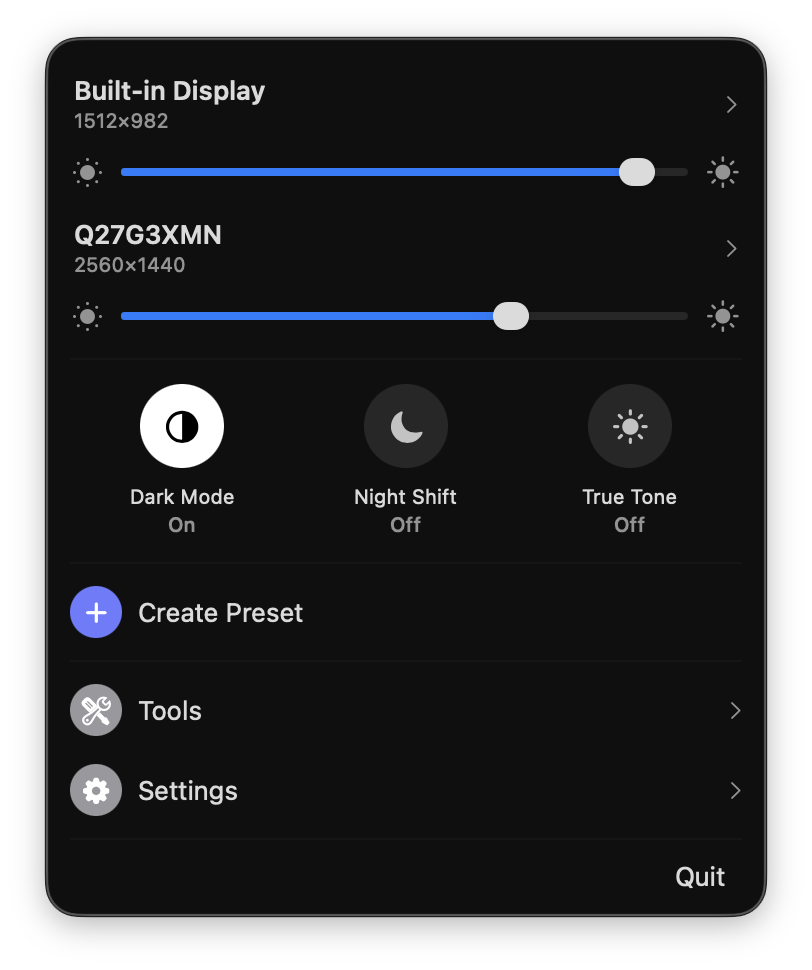
One panel. Every display, dialed in.
HiDPI on any display
Retina-style scaled resolutions on external monitors, sharp instead of blurry or undersized, automatic on 2K+ and always at the panel's full refresh rate.
Smooth scaling
Fine-tune how large everything looks in small steps, well beyond the handful of scaled sizes macOS offers. The flexible scaling people install BetterDisplay for, built in.
Brightness everywhere
Hardware DDC control with software fallback, and brightness keys that dim the display under your cursor, all displays, or a subset.
Extra Brightness
Push XDR MacBooks and HDR monitors past 100% by unlocking their HDR brightness reserve. The feature BetterDisplay sells as brightness upscaling, free.
Monitor volume
Control the built-in speakers of external monitors over DDC, with a slider per display and the keyboard volume keys when the monitor is your audio output.
Presets
Save whole display setups, resolution, brightness, arrangement, and apply them in one click.
Arrangement
Drag-to-arrange canvas and one-click main display switching.
Native toggles
Flip macOS Dark Mode, Night Shift, and True Tone right from the panel, no System Settings trip.
Color
ICC profile switching, HDR on/off per display, plus gamma, contrast, and gain adjustment.
Virtual displays
Create HiDPI virtual screens for streaming, sidecar setups, or headless Macs.
Extras
Combined brightness slider, auto brightness sync, keep awake, notch hiding, launch at login.
Everything a click away in the menu bar.
Crisp is free, and every feature stays free. The best way to support it costs nothing: star it on GitHub or tell a friend. If you'd also like to chip in toward keeping it signed and notarized for everyone (that runs on a $99/year Apple Developer membership), there's GitHub Sponsors, Ko-fi, and 爱发电.
Completely optional, but you'll have my heartfelt thanks.
FAQ
Something else? Ask on GitHub.
Is Crisp really free?
Yes. Every feature is free: no Pro tier, no license key, no trial, and no daily limits. The whole app is open source under the MIT license.
Is Crisp safe to install?
Yes. Every release is signed and notarized by Apple, the full source code is public on GitHub, and a Microsoft Defender review confirmed it contains no malware and no telemetry.
What does Crisp require?
macOS 14 (Sonoma) or later, on both Apple Silicon and Intel Macs. A few extras, like disconnecting a display from the menu, are Apple Silicon only.
How is Crisp different from BetterDisplay and Lunar?
The features people usually pay for elsewhere, flexible HiDPI scaling, DDC brightness, XDR/HDR extra brightness, presets, and arrangement, are all free in Crisp. See the full side-by-side: Crisp vs BetterDisplay, Lunar & MonitorControl.